100% Free — No Limit — No Registration
Watermark
Batch
Editor
Add text, logo or image watermarks to hundreds of images in seconds. Full control over position, size, transparency, font and rotation — completely free, no limits, no registration.

Watermark Batch Editor v2.0
FREE
No Cost Ever
??
No Limit
GPU
Accelerated
Features
Everything you need to watermark at scale.
From a single image to thousands — ELECSY Watermark Batch Editor handles any volume with full customization and zero quality loss.
Batch Processing
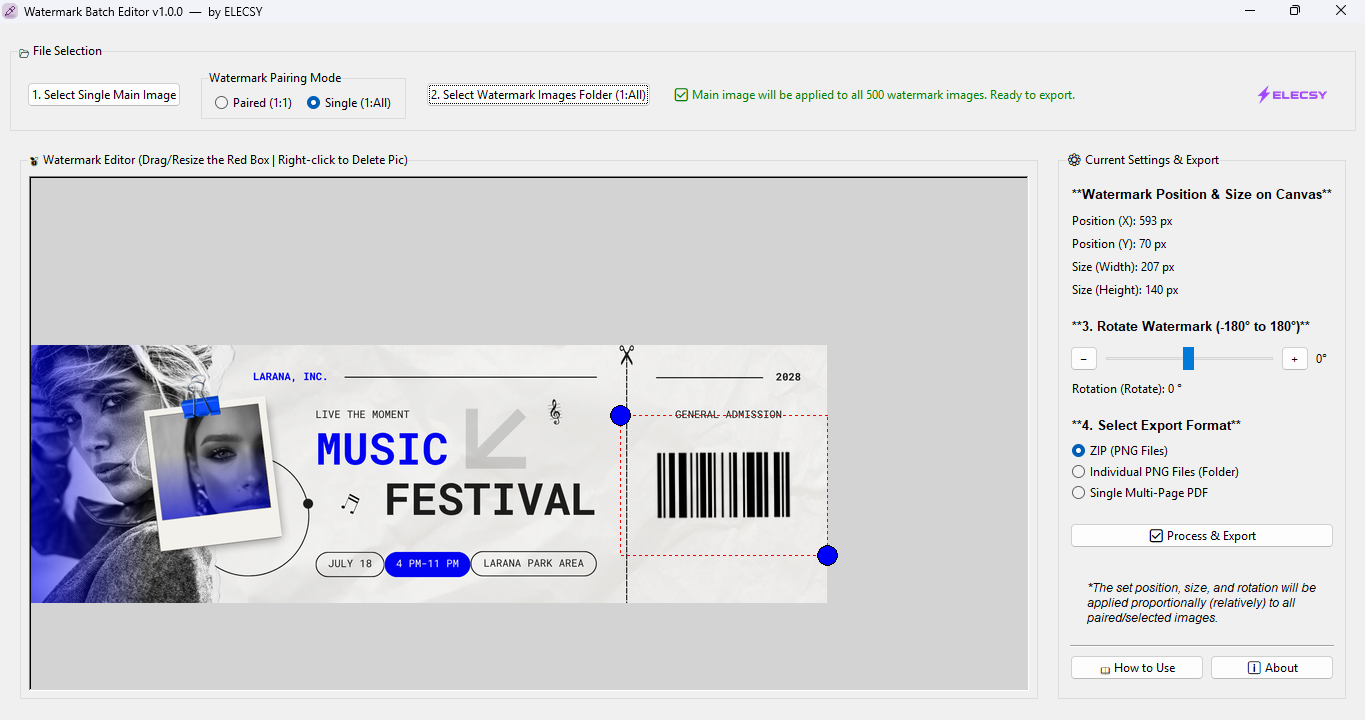
Process 100 to 1000+ images in a single run. Select a folder, configure your watermark once, and let the software handle the rest.
Text Watermarks
Add custom text watermarks with full font selection, size control, color picker, opacity adjustment and rotation. Supports all Windows fonts.
Logo & Image Watermarks
Use your PNG logo or any image as a watermark. Supports transparency. Scale, rotate and reposition the logo precisely on each image.
Position & Size Control
Place watermarks at top-left, top-right, center, bottom-left, bottom-right or any custom X/Y coordinate. Full pixel-level control.
Transparency Adjustment
Set watermark opacity from 10% to 100%. Subtle semi-transparent watermarks or bold solid marks — your choice for every batch.
Rotate & Scale
Rotate watermarks at any angle. Scale independently from the image. Diagonal, horizontal or any custom angle supported.
Live Preview
Preview exactly how the watermark will look before processing the full batch. Adjust until it is perfect, then run on all images.
GPU Acceleration
Uses your GPU for ultra-fast processing. 1000 images processed in under 2 minutes. Works even without a dedicated GPU using CPU fallback.
Multi-Format Export
Export watermarked images in JPG, PNG, WebP, BMP or TIFF. Choose output quality and compression. Originals are never overwritten.
How It Works
Watermark 1000 images in 4 steps.
01
Select Images
Choose a folder or select individual images. Drag and drop also supported. Any format accepted.
02
Configure Watermark
Set watermark type, text or logo, position, size, opacity, rotation and font. Preview in real time.
03
Run Batch
Hit process. The software handles all images automatically using GPU acceleration. Progress shown in real time.
04
Export Output
All watermarked images saved to your output folder. Originals untouched. Ready to use immediately.
Watermark Types
Three ways to protect your images.
Text Watermark
Add your name, brand, copyright notice or any custom text. Full font, color, size and opacity control. Supports all Windows fonts including Bengali.
Logo Watermark
Use your PNG logo with transparent background. Scale and position precisely on each image. Supports semi-transparent logos for subtle branding.
Image Watermark
Use any image as a watermark — signature, stamp, seal or custom graphic. Full resize, rotate and opacity control included.
Who Uses It
Built for anyone who works with images.
Photographers
Protect event photos before client delivery
E-commerce
Brand all product images before upload
Designers
Protect portfolio work and client previews
Content Creators
Brand social media images in bulk
Shop Owners
Watermark product catalogue before sharing
Educators
Protect course materials and worksheets
Media & Press
Add copyright to photos before publishing
Real Estate
Brand property photos with agency logo
Specifications
Built for speed and precision.
Platform
Windows Desktop
Runs fully offline. No internet required. Works on Windows 10 and Windows 11.
Processing Speed
1000 images in ~2 min
GPU accelerated processing. Falls back to CPU automatically if no GPU is available.
Input Formats
JPG, PNG, BMP, TIFF, WebP, GIF
Accepts all major image formats. Mixed format batches fully supported.
Output Formats
JPG, PNG, WebP, BMP, TIFF
Choose output format and quality separately from input. Originals are never modified.
Batch Limit
Unlimited
No cap on batch size. Process as many images as your storage allows in a single run.
Cost
৳0 — Completely Free
No subscription, no registration, no ads, no hidden charges. Download once and use forever with no limits.
FAQ
Common questions.
How do I download the software?
You can download the software directly by clicking the "Download Now" button on this page. It is a standalone Windows executable. It is completely free — no registration or ticket required.
Will my original images be modified?
Never. The software always saves watermarked images to a separate output folder. Your original images are completely untouched.
Does it work without internet?
Yes. The software runs 100% offline. No internet connection is required for any feature including processing, preview or export.
What is the maximum batch size?
There is no limit. You can process as many images as your storage allows in a single batch run. Performance depends on your hardware.
Can I use my logo as a watermark?
Yes. Use any PNG image with a transparent background as your watermark. The software preserves transparency and lets you scale and position it precisely.
Does it support Bengali fonts?
Yes. The software uses all installed Windows fonts including Bengali fonts like Kalpurush, SolaimanLipi and others. Any font installed on your PC works.